Command/definebreakpoint
< Command
Jump to navigation
Jump to search
\definebreakpoint
Syntax (autogenerated)
| \definebreakpoint[...][...][...=...,...] | |
| [...] | name |
| [...] | character |
| type | 1 2 3 4 5 |
| nleft | number |
| nright | number |
| left | command |
| middle | command |
| right | command |
| range | yes no |
| language | language |
Syntax
| \definebreakpoint[...][...][...=...] | |||||||||||
| [...] | name of breakpoint set to add to | ||||||||||
| [...] | character at which to break | ||||||||||
| language | two-letter code: language for which this breakpoint applies | ||||||||||
| nleft | number: minimal characters to left to allow breaking' here' | ||||||||||
| nright | number: minimal characters to right to allow breaking here | ||||||||||
| type |
|
||||||||||
| middle | 'how breaking character should display when no break takes place. Used in combination with {{{1}}}. |
||||||||||
| left | how breaking character should display at break, at end of first line. Used in combination with {{{1}}}. |
||||||||||
| right | how breaking character should display at break, at start of second line. Used in combination with {{{1}}}. |
||||||||||
Description
\definebreakpoint[setname][?][...=...] defines a breakpoint at ?, and makes it a member of a set that can be activated with \setbreakpoints[setname]. The set must be initialized with \definebreakpoints[setname].
Example
This is how the compound breakpoint set is defined in typo-brk.mkiv
\definebreakpoint [compound] [+] [nleft=3,nright=3,type=1]
\definebreakpoint [compound] [-] [nleft=3,nright=3,type=1]
\definebreakpoint [compound] [/] [nleft=3,nright=3,type=1]
\definebreakpoint [compound] [(] [nleft=3,nright=3,type=2]
\definebreakpoint [compound] [)] [nleft=3,nright=3,type=3]
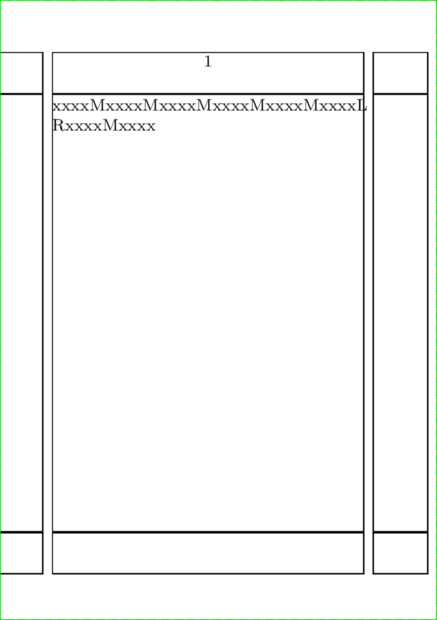
An illustration of a custom breakpoint of type 5:
\definebreakpoints[test]

\definebreakpoint [test] [?] [type=5,left=L,right=R,middle=M]

\setbreakpoints[test]

\setuppapersize[A7]

\starttext \showframe
xxxx?xxxx?xxxx?xxxx?xxxx?xxxx?xxxx?xxxx\par
\stoptext
More Examples
Hyphenate at any character
In some cases, you might need not to break at a hyphen or other breakpoint, but don't have a chance to put \unhyphenated explicitly. In this case, you may omit the second argument and activate the following breakpoint set instead.
\define[2]\mycommand{
    \startxrow
    \startxcell cmd #1 \stopxcell
    \startxcell #2 \stopxcell
    \stopxrow
    }
\starttext

\setupxtable[width=5cm]
\startxtable
\mycommand{A}{lsfkgjfk-gshgkhigewhgajkdkfkalhfdklahfkhaakfakfh}
\stopxtable

Now setting no specific breakpoint character set:

\definebreakpoint[mybreaks][][type=1]
\setbreakpoints[mybreaks]

\setupxtable[width=5cm]
\startxtable
\mycommand{A}{lsfkgjfk-gshgkhigewhgajkdkfkalhfdklahfkhaakfakfh}
\stopxtable

\stoptext
See also
- Hyphenation
- \hyphenation to define the hyphenation of a specific word
- \startexceptions to define language-specific hyphenations
- \- to define an ad-hoc breakpoint
- \unhyphenated to prevent hyphenation
- \doublehyphendemerits to penalize hyphenation on consecutive lines
- \setupalign justification parameters to tweak the auto-hyphenation algorithm
- \definebreakpoints to initialize a breakpoint set
- \definebreakpoint to add to a breakpoint set
- \setbreakpoints to activate a breakpoint set
- \language to activate a language's settings, including hyphenation
- Wrapping
- typo-brk.mkiv
Help from ConTeXt-Mailinglist/Forum
All issues with:

