\setupalign
Syntax (autogenerated)
| \setupalign[...,...] |
| [...,...] | broad wide bottom height line high low lohi flushright flushleft middle yes no width normal reset inner outer flushinner flushouter left right center disable last end paragraph lefttoright righttoleft l2r r2l table lesshyphenation morehyphenation hanging hangingboth nothanging hz fullhz nohz hyphenated nothyphenated tolerant verytolerant stretch extremestretch final 1*final 2*final 3*final 4*final more 1*more 2*more |
Description of keys
Horizontal alignment
normal *or* width *or* yes
|
justified alignment
|
middle
|
centered lines
|
flushleft *or* no *or* right
|
left-aligned (The right is from 'ragged-right'. Don't use it.)
|
flushright *or* left
|
right-aligned (Again, better to not use left.)
|
inner
|
Flush to inner margin.
|
outer
|
Flush to outer margin.
|
disable
|
Used only for oneliners. Equivalent to flushleft, but something called \parfillskip is set to zero.
|
last
|
Justified, with last line centered.
|
How wide do we let the lines get?
wide
|
Lets ragged-right, ragged-left, and middle lines be wider. (Makes them be wider?)
|
broad
|
Similar? Used in tables.
|
Where would we like the bottom line to end up?
bottom
|
Ragged-ish bottom (the room for variation is but a single lineheight, of course).
|
height
|
Fill the height: press the last line's baseline against the lower boundary.
|
line
|
Let the last line's descenders touch the lower boundary.
|
Vertical alignment within boxes, e.g. \framed or table cells
high
|
Align to top
|
low
|
Align to bottom
|
lohi
|
Vertically centered
|
Predefined combinations
table
|
Equivalent to flushleft,broad,high
|
reset
|
Equivalent to normal.
|
center
|
Equivalent to middle,broad.
|
Typesetting direction --- which direction do you write in?
lefttoright *or* l2r
|
"Hello, world."
|
righttoleft *or* r2l
|
".dlrow ,olleH"
|
Nicer justification and microtypography
hanging
|
Enable hanging punctuation ('protrusion')
|
nothanging
|
Disable hanging punctuation
|
hz
|
Enable slight stretching of characters ('font expansion'). Works only with stretch.
|
fullhz
|
Enable not only stretching of characters but also additional kerning. Works only with stretch.
|
nohz
|
Disable font expansion.
|
hyphenated
|
Allow hyphenation.
|
nothyphenated
|
Prevent hyphenation.
|
lesshyphenation
|
Less hyphenation. Not sure whether this is relative/additive, or absolute.
|
morehyphenation
|
More hyphenation. Not sure whether this is relative/additive, or absolute.
|
tolerant
|
Allow looser final paragraphs (more hyphenations, more stretching) to avoid
overfull hboxes.
|
verytolerant
|
Allow even more loose paragraphs.
|
stretch
|
Allow spaces to be stretched extra far. Can be combined with (very)tolerant, and usually is. Needed for hz to work.
|
tight
|
Together with flushleft or flushright: Try to balance lines, meant for titles.
|
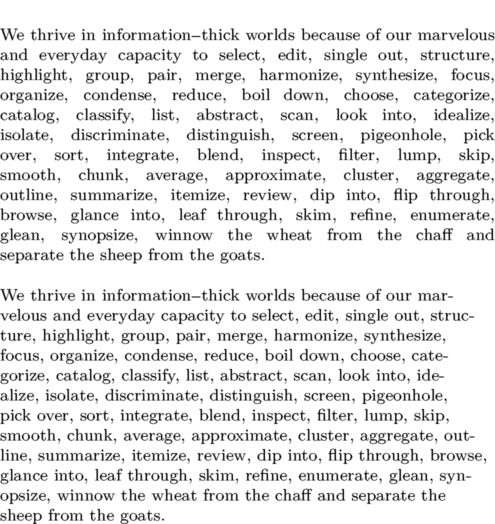
Example
\setuppapersize[A6]
\setupalign[nothyphenated,justified,hanging]
\setupwhitespace[line]

\input tufte

\setupalign[hyphenated,morehyphenation,flushleft]
\input tufte
See also
Help from ConTeXt-Mailinglist/Forum
All issues with:

