Command/ startnarrower
< Command
Contents
\startnarrower ... \stopnarrower
Summary
The instances of \startnarrower ... \stopnarrower are used for text with a smaller width than the main text. It can be indented on one or both sides.
Settings example
| \startNARROWER[...,...] ... \stopNARROWER | |
| [...,...] | [+-]left [+-]middle [+-]right number*left number*middle number*right reset reverse |
| Option | Explanation |
|---|---|
| [+-]left | increase left-hand margin |
| [+-]middle | increase margin on both sides |
| [+-]right | increase right-hand margin |
| number*left | increase left-hand margin by a multiple of the default value (decrease with negative number) |
| number*middle | increase both margins by a multiple of the default value (decrease with negative number) |
| number*right | increase right-hand margin by a multiple of the default value (decrease with negative number) |
Description
Make the margins wider on the left, the right, or (default) both sides. The default value is 5 mm; use \setupnarrower to change it, or use the parameters of \startnarrow. Using
\startnarrower[left=2cm] does not work.
By preceding the argument with a negative sign (eg. \startnarrower[-2*left]) the text area can be made wider rather than narrower.
Examples
Example 1
\setuppapersize[A5]

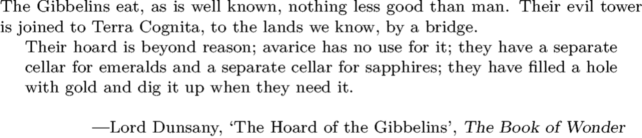
The Gibbelins eat, as is well known, nothing less good than man. Their evil
tower is joined to Terra Cognita, to the lands we know, by a bridge.

\definenarrower[asym][left=1cm,right=3cm]

\startasym
    Their hoard is beyond reason; avarice has no use
    for it; they have a separate cellar for emeralds and a separate cellar for
    sapphires; they have filled a hole with gold and dig it up when they need it.
\stopasym

\blank[line]

\rightaligned{—Lord Dunsany, \quote{The Hoard of the Gibbelins}, \emph{The Book of Wonder}}