Command/writebetweenlist
Contents
\writebetweenlist
Summary
Settings
Description
The default table of contents is combined list. To write to it one has to choose the level to which it should be inserted: \writebetweenlist[chapter][location=here]{\hrule}, \writebetweenlist[section][location=here]{\hrule}, etc.
Examples
Example 1
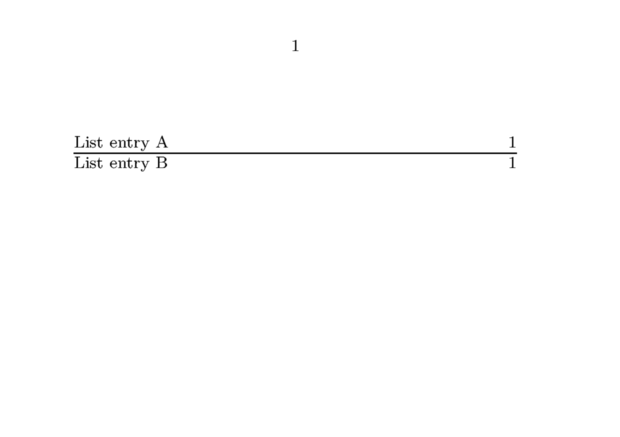
\setuppapersize[A7,landscape]
\definelist[Reprints][criterium=all]

\starttext
\completelist[Reprints]
  \writetolist[Reprints]{1.}{List entry A}
  \writebetweenlist[Reprints][location=here]{\hrule}
  \writetolist[Reprints]{2.}{List entry B}
  %\writetolist[Reprints]{3.}{List entry C}
\stoptext
Example 2
According to http://archive.contextgarden.net/message/20101213.221208.577b0e51.en.html \writebetweenlist has multiple usage and these are conflicting:
- in order to get the right page info associated it needs to be anchored in the text stream
- in that case a node can interfere with spacing and can come unexpected
- sometimes direct flushing is needed, sometimes delayed
An option has been added to (1) the flushers and (2) the list placers. (as december 14, 2010).
Regular list entries are bound to a specific location in order to
get the right pagenumber etc. associated. When pushing something
inbetween (in mkiv) it ends up directly in the list. This is the
default because otherwise users will wonder why spacing might get
messed up (due to an unseen but present node). It is possible to
force a location by explicitly setting location to here.
Another way to force a certain order is to set the order
variable when placing a list. The command option only
pushes commands into the right order, and all orders all
entries (which might be too much). In this case no specific
location is needed with the inbetween method.
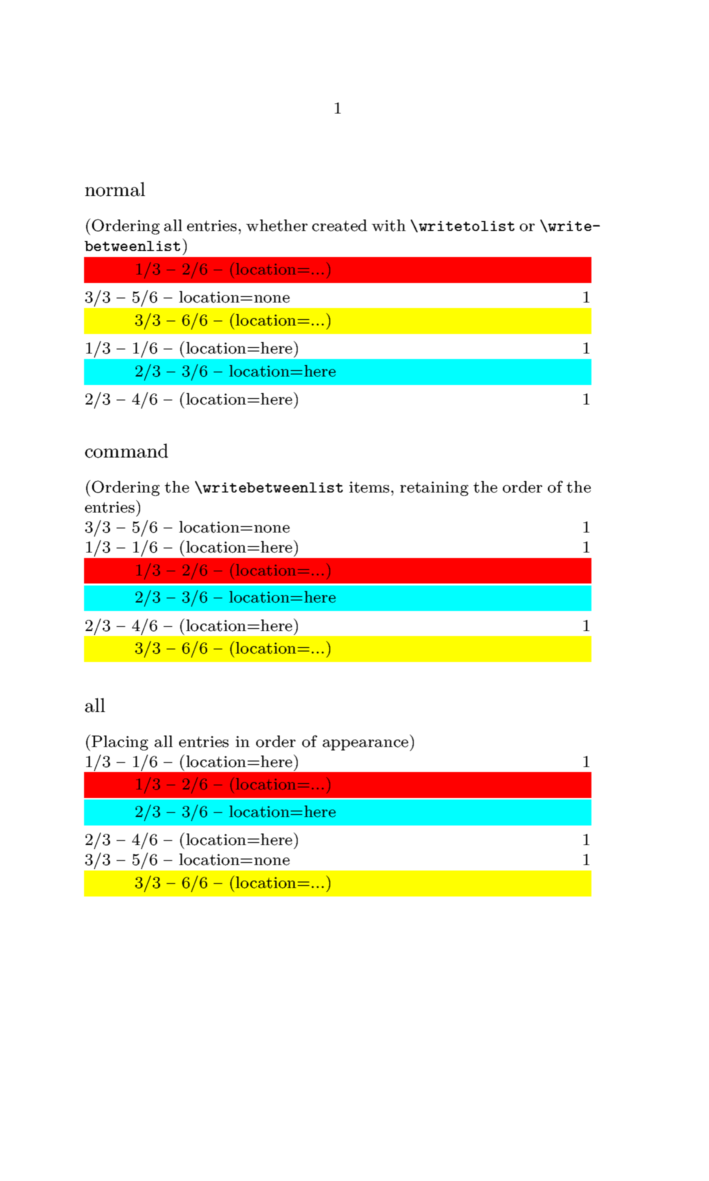
The following example shows this:
\definepapersize[scroll][width=12cm, height=20cm]
\setuppapersize[scroll]

\definelist[testlist][criterium=all]

\starttext

    \subject{normal}
    (Ordering all entries, whether created with \tex{writetolist} or \tex{writebetweenlist})
    \placelist[testlist]

    \subject{command}
    (Ordering the \tex{writebetweenlist} items, retaining the order of the entries)
    \placelist[testlist][order=command]

    \subject{all}
    (Placing all entries in order of appearance)
    \placelist[testlist][order=all]

    % --- and now we put write the entries to the list ---

    \writetolist     [testlist]               {1}
        {1/3 -- 1/6 -- (location=here)}

    \writebetweenlist[testlist]{
        \framed[width=\hsize, frame=off,
                background=color, backgroundcolor=red,
                align=flushleft]
        {\blackrule[width=2.5em, height=0em]
         1/3 -- 2/6 -- (location=...)}}

    \writebetweenlist[testlist][location=here]{
        \framed[width=\hsize, frame=off,
                background=color, backgroundcolor=cyan,
                align=flushleft]
        {\blackrule[width=2.5em, height=0em]
         2/3 -- 3/6 -- location=here}}

    \writetolist     [testlist]               {2}
        {2/3 -- 4/6 -- (location=here)}

    \writetolist     [testlist][location=none]{W}
        {3/3 -- 5/6 -- location=none}

    \writebetweenlist[testlist]{
        \framed[width=\hsize, frame=off,
                background=color, backgroundcolor=yellow,
                align=flushleft]
        {\blackrule[width=2.5em, height=0em]
         3/3 -- 6/6 -- (location=...)}}

\stoptext
Notes
See also
- \definelist
- \setuplist
- strc-lst.mkvi
- \writetolist to write a regular item to a list

